The Setup
If you don’t set up your green screen correctly, it might be game over before you even start filming. You basically want a nice flat, saturated colour. It should be as far away from your actors/rest of your set as possible - ideally they won’t cast shadows on it, which will change the lighting on it.
If you’re being really Gucci, you’ll have a light pointed just at the screen to really flatten it out.
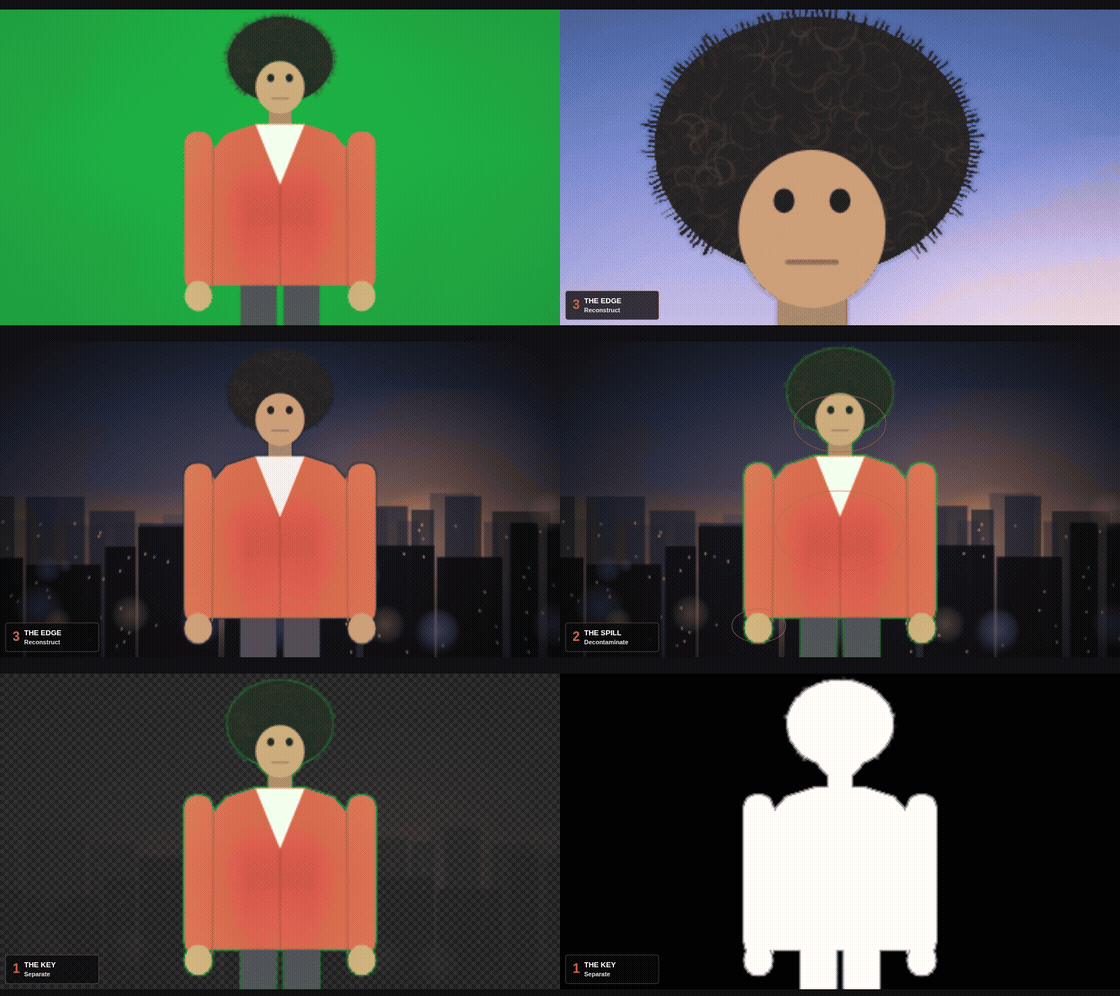
Once you’ve filmed the screen, it is possible to just “click away the green” and you're done, but it will look like a green screen. For a good key, it’s 3 steps, not 1:
1. The Key
This is the part everyone knows. You isolate the colour, you make it transparent. But a clean key on its own almost never looks finished, because it only solves transparency, not believability.
2. The Despill
Green light bounces. It lands on your subject's edges, their hair, their skin. Pull a key without dealing with spill and your talent has a faint green halo, even against a totally different background. This is the step most beginners skip entirely.
3. The Edge Handling
The final gap between "obviously composited" and "actually there." Hard edges, wrong edge colour, missing motion blur, these are the tells that separate convincing composites from ones that scream fake.
Get all three right and the background disappears (in the best way). Get even one wrong and no amount of lighting will save the shot.
We built a full interactive breakdown of all three, with visual examples of what goes wrong at each stage and how to fix it.