Every 3D model eventually needs a texture wrapped around it. The problem is a texture is flat and your model isn't, so something has to give. That something is UV mapping, and if you bodge it, your texturing may suffer
The Orange Peel Problem
Try to flatten an orange peel without tearing it and you'll see the issue immediately: you either cut it in places or you accept some distortion. UV mapping is that same tradeoff, applied to every 3D model you'll ever texture. Cut in the wrong place and you get a visible seam. Don't cut enough and you get stretching where the geometry had to compress to lie flat.
There's always a trade off between cuts and stretching. In the "Your First Character" series, I go over the essentials of UVing in Blender, which you can check out here
Auto Unwrap Vs Doing It By Hand
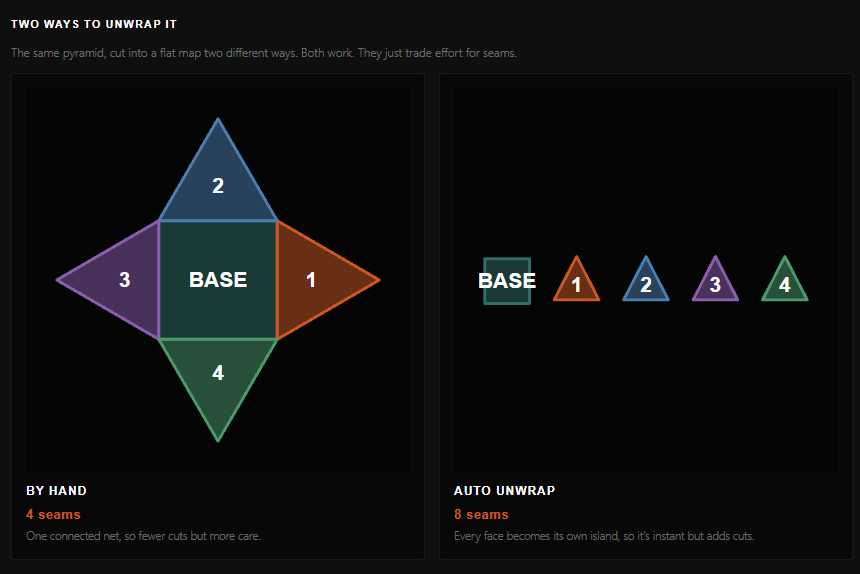
Automatic unwrapping will get you a working result fast, but it tends to make more cuts than a careful pair of hands would, because the software is optimising for speed, not for where a seam is easiest to hide.
Unwrapping by hand takes longer, but you get to decide exactly where the seams fall, tucked into a hairline, hidden under a collar, run along a natural edge instead of straight across a face. For anything that's going to be seen up close, that decision is worth the extra time.
When I was a student, the tools for UVing were 2% as slick as what you get for free in Blender today. Unwrapping a character was a process of many late nights, head phones on, pulling around points. There's something satisfying about it, though, so I've recreated it as a game in this UVing cheat sheet.
Why Resolution Isn't Just One Number
Once a model gets detailed enough, a single texture isn't enough space to hold the detail you need. That's what UDIMs solve, splitting the UV space into multiple tiles, each with its own full resolution texture, so a character's face can carry as much detail as their entire body used to share. It sounds like a technicality until you're the one trying to fit pores and stitching into the same 2K square.
In my company, we normally use 8-16 separate 4k or 8k textures for a character, because we're not insane. A lot of the big boys use hundreds for the same character (They don't look better than ours though. Textures follow the same rules as an all-you-can-eat buffet - take what you need and no more, otherwise you'll pay the price later)
Why This Matters Beyond Modeling
Bad UVs don't stay a modeling problem. They follow the asset into texturing, into lookdev, into comp, showing up as a warped logo, a seam that catches the light wrong, or a texture that looks fine from one angle and wrong from every other. Spotting the cause means understanding what's happening underneath, not just nudging the texture and hoping.
Get your clicking fingers ready and get ready to learn, as you enter…