
Taking Control of AI Performance
Most AI video work is plug and pray. You generate an image, feed it to a model, and hope the performance comes back the way you pictured it. In this week's Follow Along we went the other way, chasing as much precise, directorial control over an AI generated performance as we could get.
Here is what came out of the session.
The Core Pipeline Is Simpler Than It Looks
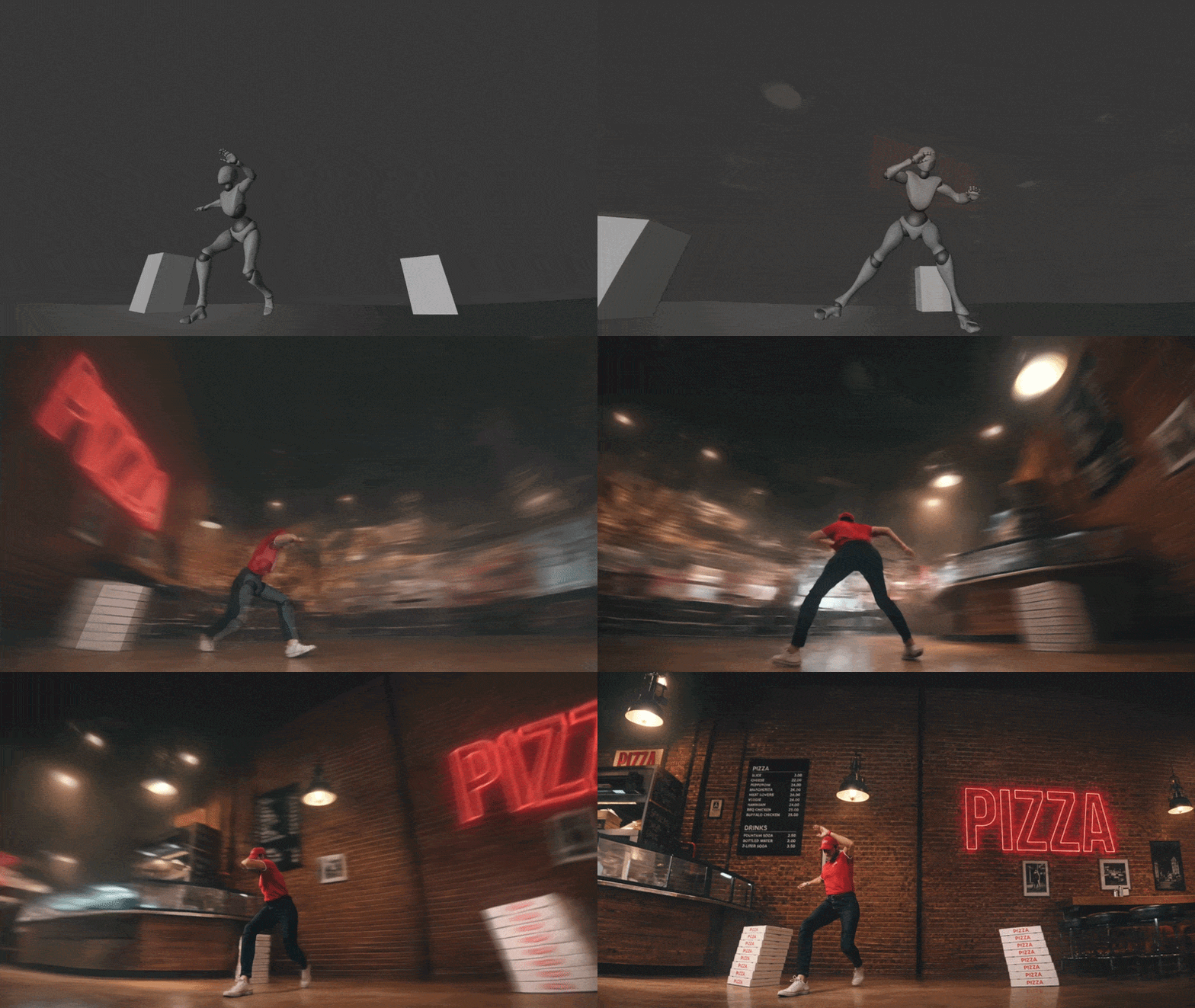
Every result in the workshop, from a boxing mocap clip to a dancing pizza delivery man, came from the same three steps:
- Start with an input video. Filmed footage, a 3D scene, or another AI clip.
- Pull one clean frame out of it, then edit that frame with an image AI. Pick the frame that carries the most information, not the one where your subject is halfway out of shot.
- Run it through a video to video model. Seedance, Kling, or Google's new Omni.
That is the entire spine. Get the frame right, and the rest follows.
Do The Heavy Lifting On The Image, Not The Video
Video generations through commercial models are expensive and unpredictable, often a few dollars a pop. So if you're using them, the guiding principle is to load as much visual quality as possible onto the still image, where a failed attempt costs cents rather than dollars. Get the frame right first, then let the video model simply carry the motion. Chasing a look by re-rolling video generations is the fastest way to burn your budget.
Keep Your Prompts Short
There is a real temptation to write long, flowery prompts, to using ChatGPT or Claude to create the prompt for you. That's fine for generation from scratch, but for control when editing a video or image, resist it. A shorter prompt introduces less noise and keeps the model from arbitrarily changing things you wanted left alone. Describe the performance and the essentials, nothing more.
The same goes for image editing: keep instructions blunt and specific, like "replace environment, do not change composition or pose."
3D Or Your Own Footage Is Where The Directorial Control Lives
The biggest unlock is driving your generation from a source you fully control, whether that's a 3D scene or footage you've filmed yourself. In the workshop we used free Mixamo mocap dropped into Blender, but the same principle holds either way. Once you're driving the shot, you control everything a real camera gives you: angle, focal length, lens width, and camera moves. We animated a push in, then went full Michael Bay by parenting the camera to an empty and spinning it 360 degrees around the performer.
Adding simple boxes at different depths gave the shot real parallax and something for the camera to move through.
Every Model Has A Trade-Off
Our own Performance Driven AI template is designed for precise control and massive cost savings. Seedance is the social media favourite but gives up a lot of control and tends to reinterpret rather than match. Kling is stricter and better when you need precise timing and a near one to one result. And for the biggest gains in both cost and control, our template lets you drive generations with depth maps and multiple weighted keyframes, at roughly a dollar for sixty generations instead of a few dollars each.
The Real Skill Is Problem Solving
I know I bang on about problem solving a lot, but that's so much of what filmmaking is. When we're in crunch mode delivering a project, my brain feels like it gets put in a tumble drier from the moment I step into the office, and spun around nonstop until I leave.
None of this has clean rules, same as filmmaking in general. Expect to hit problems every session and get comfortable solving them. That is the job. If you can't get around it, my advice is always the same - reach out on Discord. There's a free box of cookies if you hit a problem that we can't solve (exceptions - we can't make people fall in love with you, bring people back from the dead, or grant you more wishes).