
Mar 20
/
Christian Bull
Inpainting for Filmmakers
What it is, how it has been done, and what AI is changing.
As we release our inpainting template - the result of a tonne of RnD our end - let’s take a beat to understand what the skill is, and why it matters.
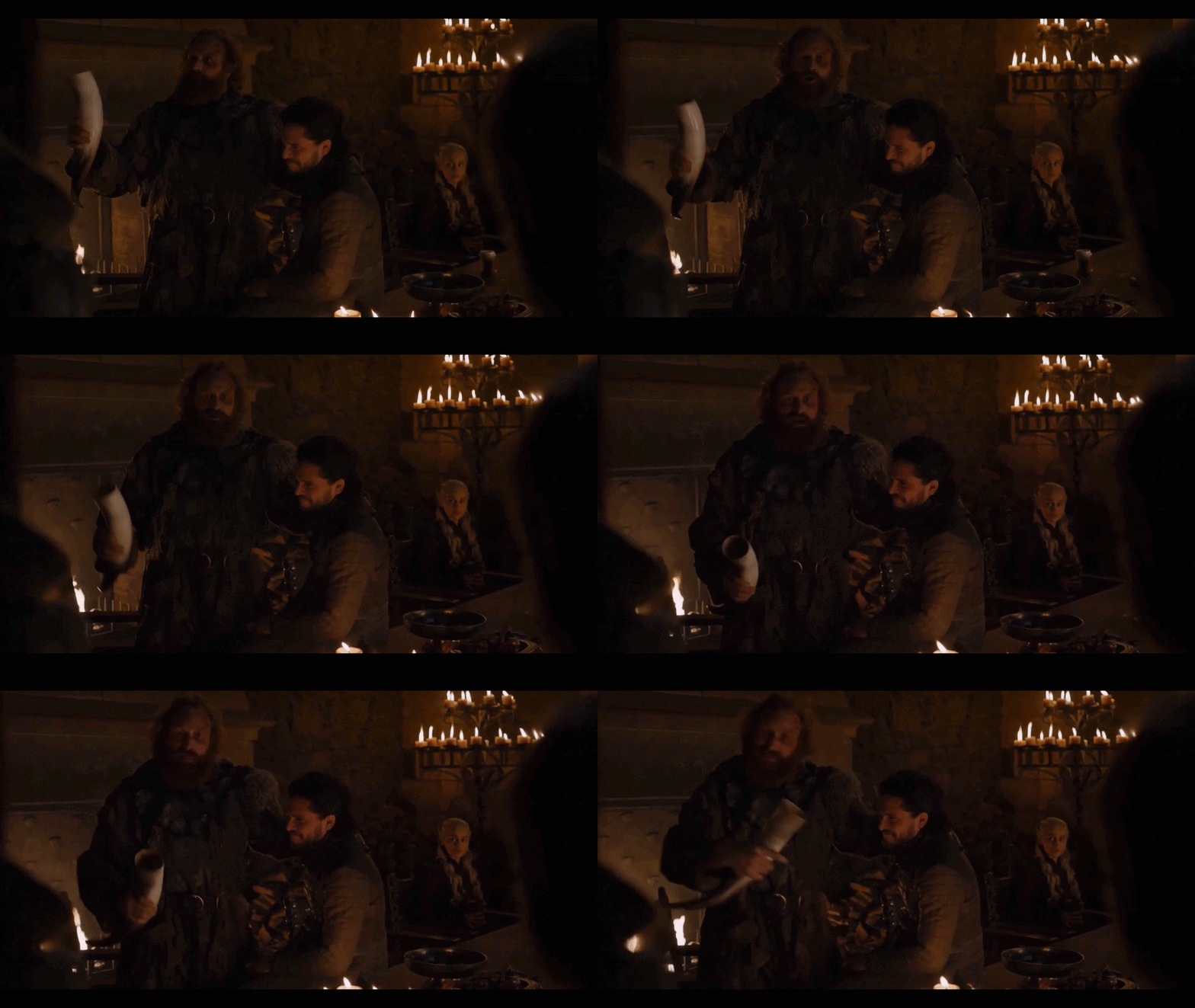
Who knows what HBO paid to fix this cup! The fact that the camera is moving makes it a reasonably difficult in painting shot. This isn’t their fix though, it’s our inpainting template handling it in a few clicks.
Empty space, drag to resize
What is inpainting and why does it matter?
In the same way that a painter would aim to restore a classic painting in a way that doesn’t show their involvement, inpainting involves removing an unwanted object from shot, and then “inpainting” the hole that is left by its removal. It is the beating heart of “invisible FX” - that is to say, VFX that no one notices and then praises the film for doing everything in camera!
If you’ve filmed shots and never needed it, well goddamn, you run a tight ship on set. For the rest of us, we need to know how to remove stuff in post! Here are the most likely scenarios when you’ll need it;
Wire and rig removal
In professional films, you’ll have stunt actors getting pulled all over the place by wires, which obviously need removal (and then the gap inpainted). Maybe you’re not going to hit that in your own work, but you can create magic really easily by just having someone lift something using a rod or wire, and painting it out.
Set cleanup
Even on a tightly controlled set, you’ll encounter imperfections - crew visible in reflections, a boom sneaking into shot, a prop falling over in the background mid-take. All classic scenarios for inpainting. Period films need a lot of inpainting to remove anachronistic background buildings, road signs, fire alarms and so on.
Object removal and set extension
When you’re shooting outdoors, you’ll regularly have curious folk making their way into shot, that need to be removed with extreme prejudice, and inpainting beats physical violence 9 times out of 10.
On a larger scale, you might find yourself looking to replace a large section of set, for example to have half of a building destroyed. This straddles the worlds of digital matte painting and 3D, but inpainting skills are often a part of it.
On a larger scale, you might find yourself looking to replace a large section of set, for example to have half of a building destroyed. This straddles the worlds of digital matte painting and 3D, but inpainting skills are often a part of it.
Empty space, drag to resize
How it's been done traditionally
Traditional inpainting can take anywhere from 10 minutes to weeks. It depends on camera movement, and what the thing is that needs to be inpainted, and the length of the shot (a blank background is much easier to paint in than a horse’s face…). Here’s the basic process;
Clean plate
The cleanest solution: shoot the scene again with the problematic element removed, keeping the camera and lighting identical. In post, you composite the clean version over the original wherever you want to inpaint. Incredibly simple but still the gold standard. One huge downside - it works perfectly with a still camera, but if the camera moves, you’re screwed (unless you have motion controlled cameras)
Clone stamping and patch tracking
When you don't have a clean plate, you build one synthetically. Essentially, you sample a region of usable background, track its motion through the shot, and tile or offset it to cover the problem area frame by frame.
Clone stamping and patch tracking
When you don't have a clean plate, you build one synthetically. Essentially, you sample a region of usable background, track its motion through the shot, and tile or offset it to cover the problem area frame by frame.
It’s really worth learning these skills because they help in a thousand other areas, but they are intermediate level, not beginner.
Empty space, drag to resize
Enter the Shoot First Template
There are a lot of people using comfyUI for inpainting, and a lot of models designed to do it. We haven’t seen any results that could rival professional inpainting, so we built our own approach.
It’s a surprisingly difficult problem to solve. Inpainting AI is everywhere for static images (my Samsung phone does it, and as I write this some guys on TikTok have gotten into hot water for creating a product that “inpaints” clothes away). Temporal stability (inpainting reliably over multiple frames) is much harder to solve. So we’ve solved it for you.
Empty space, drag to resize
What this means for you
The practical upshot for independent filmmakers is that the floor has dropped considerably. Work that used to require a specialist compositor and a day rate is now within the grasp of someone just starting out. Some things to consider
- Our template does a lot of heavy lifting, but it’s not plug and play. Inpainting requires 3 basic steps - generating a clean plate, generating a mask of the thing getting removed, and generating the painting. These need to be refined per shot. We can give you the ingredients and the oven, but you’re going to have to do some mixing yourself if you want a delicious cake.
- It’s computationally expensive, meaning that you might need to use a more powerful computer on Runcomfy, which means more cost. For digital makeup, you’re paying cents per shot. With inpainting, it’s unlikely to creep into dollars, but it’ll move in that direction.
- Planning is still king and always will be for lower budgets. Shoot clean plates where you can, even if you think you won’t need them. Five extra minutes on the day can save hours in post, AI tools included.
Empty space, drag to resize
If you’re a Shoot First platform subscriber, you can access the template and explainer videos here:
Empty space, drag to resize
Write your awesome label here.
Write your awesome label here.
Write your awesome label here.
Write your awesome label here.
Success! You're all signed up to the follow along!
Keep an eye on your email for updates and reminders
Write your awesome label here.
Write your awesome label here.
Write your awesome label here.
How do you want to make your film?
Close
Claim your 20% off
Thank you!