
Jun 30
/
Christian Bull
KNOW YOUR LENSES
If you've watched any videos of Kevin Smith's (Director of Chasing Amy, Mallrats, Clerks, Dogma) talks, you'll have heard the story of the time Bruce Willis completely chewed him up for not knowing his lenses.
Willis found himself completely unable to respect a director that didn't have a solid technical understanding of the craft - although in my experience, that's about half of the directors I've worked with, both indie and Hollywood. Quite a few people are lucky enough to find a route to filmmaking where other people make the technical decisions for them, allowing them to focus entirely on the creative aspects.
I can't teach a process that relies on being lucky though! So my recommendation? Spend a small amount of time learning the very basics of how lenses work and how they impact the visual result.
At the bottom of this e-mail, we've put together a cheat sheet that allows you to change focal length, sensor size, and aperture on a lens and see how it impacts the end result. For now though, here's the key information you'll want to know to stop anyone going full yippee kiyay on you:
Empty space, drag to resize
01 — Focal Length
Wide vs Long
The mm number on a lens tells you how wide or tight it sees. Low number, wide view. High number, narrow view. But the real decision isn't framing - it's feeling.
Wide (24mm and below) - to fill the frame you move close. The background pushes away, features distort slightly. Immediate, raw, present.
Long (85mm and above) - to fill the frame you move back. The background compresses in. Features flatten. The viewer watches from a distance.
50mm - the sweet spot. Closest to how the human eye perceives depth. Neutral. Observational. A good default when in doubt.
Worth noting: the same lens behaves differently depending on your camera's sensor size. A 50mm on a full-frame acts like a 50mm. On an APS-C it behaves more like an 80mm. This is crop factor - and it's covered in the cheat sheet.
Empty space, drag to resize
02 — Aperture
Light and Focus
If you don't have access to a camera outside of your phone, that's normally fine - most phones will let you change them. If you're lucky enough to have a relatively modern phone, I highly recommend the Black Magic Camera app, which is free and gives you a professional camera interface on your phone. If you get used to playing with the exposure triangle there, you're learning the same language as you would on a professional camera and lens.
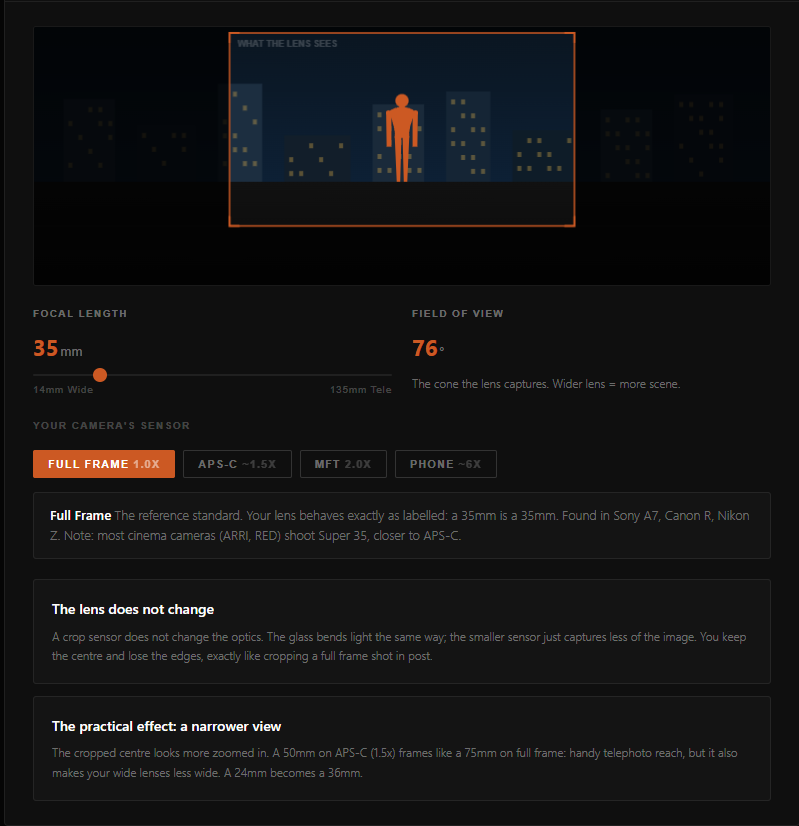
The interactive cheat sheet lets you adjust focal length, sensor size, and aperture and see the result in real time - click the button to take a look.
Empty space, drag to resize
Empty space, drag to resize
Empty space, drag to resize
Write your awesome label here.
Write your awesome label here.
Write your awesome label here.
Write your awesome label here.
Success! You're all signed up to the follow along!
Keep an eye on your email for updates and reminders
Write your awesome label here.
Write your awesome label here.
Write your awesome label here.
How do you want to make your film?
Close
Claim your 20% off
Thank you!