
Jun 12
/
Christian Bull
LTX solves HDR AI!
(Well not really but it's still very cool)
This week we're releasing 2 new ComfyUI templates, which integrate LTX's open source HDR model/LoRA, allowing you to add bit depth to your existing videos, or create "16-bit" videos from scratch.

Empty space, drag to resize
WHAT IS BIT DEPTH?
For those of you who aren't familiar with bit-depth as a concept, it's basically the range of colour that a video can store. Imagine that you walk into a darkened room - it may initially appear black, but as your pupils open up to allow more light in, you can see more and more information. So your eyes and brain can see a greater range of colour, depending on the lighting conditions.
More bit depth allows a video to "open its pupils" (or close them). A black video at 8-bit can only be a black video. At higher bit depth (typically 10 or 12-bit), you can brighten it to find the information hidden in the blacks.
That's just an example. The same happens with whites, and with colours - basically you're storing a greater range of colour, giving you more room to play with the image in post production.
Working at a higher bit depth isn't essential, unless you're working professionally, in which case it's a must. If Netflix asks you to make the shot brighter so you can see more of it, you can't say "No". Well, someone said no to HBO on House of the Dragon, because that show came out dark, but I digress.
Since a higher bit depth is essential for professionals, having a model that allows you to work in a 10-bit workflow whilst using AI is a big deal - and that's exactly what this LTX model does...
OR DOES IT?
Eh.. sort of.
I'm always ready to throw a bucket of icy water on AI hype nonsense, because it's out of control, but with LTX I'm going to tuck it into bed, and make it a nice cup of hot chocolate. It's clever as hell, and in the right conditions works pretty nicely, although I'm still going to dunk it's toes into a glass of fairly cold water after, because honestly it's quite limited.
Here's the low down:
Empty space, drag to resize
IT'S A FAKE. JUST A REALLY CLEVER ONE.
The video is actually STILL generated at 8-bit.
AI video models generate colour values within a fixed range - essentially a numbered scale from 0 to 255. That's what 8-bit means - 256 colours in red, 256 in green, and 256 in blue. That means you can mix them to achieve 256x256x256... 16.7 million different colours.
It's a lot, but it's not enough to capture the full spectrum of human vision. 10-bit allows for 1024x1024x1024... over a billion colours.
That's much better, but AI models are trained at 8-bit, and that's already insanely computationally expensive. To create a model that generates at 10-bit would be madness.
So here's what's happening in LTX's model (white paper is here if you're feeling brainy).
It's generating an image at 8-bit, but in logarithmic space. That's a term you'll hear a LOT in film, so let's define what we're talking about.
Empty space, drag to resize
LINEAR VS. LOGARITHMIC SPACE
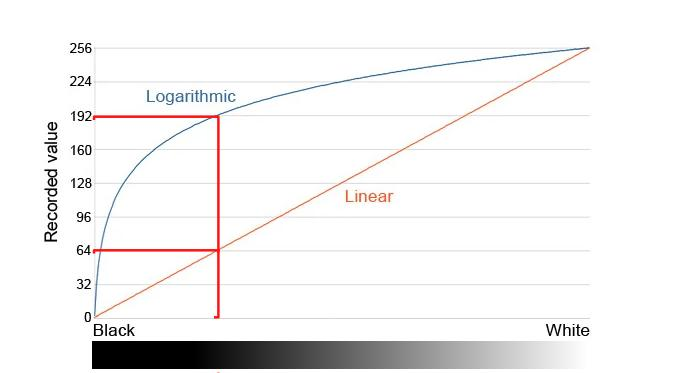
Follow the red lines…out of 256 possible buckets of space, logarithmic dedicates 192 of them to the darks, linear just 64. Logarithmic recognizes that our vision is more sensitive to the darks, so they matter more to us
From the point of view of human vision, the difference between 0 candles and 1 candle is huge. BUT the difference between 1000 and 1001 candles is impossible to spot. Our vision is logarithmic, and the easiest way to measure the increase or decrease in light is in stops, which is the doubling or halving of light. One stop brighter - double the amount of light, one stop darker, half.
But from a computer's point of view which works in "linear space", the difference between 0 and 1 or 1000 and 1001 candles is the same - it's 1 candle.
If you store a digital image in linear space (very common), all colour is treated equally. If you store it in logarithmic space, you give more room to the areas that matter more to humans.
If you store a logarithmic image in 8-bit, you can still only record the same amount of colours (16.7 million), BUT you're dedicating more space to the colours that matter (to a human). So from the human's point of view, you're storing more colour, even though technically you're not.
Now what happens if you want that colour in a linear space? Imagine the curve was a piece of string - to make it straight, you need to stretch it out, right? Increasing the range.
So while a video in this model is still generated at 8-bit, it's in logarithmic space, trained on logarithmic images (actually HDRI images from Poly Haven and the open-source short film Tears of Steel, which gave the model real-world human motion and natural lighting to learn from) - it is then decoded and transformed (stretched out to be straight), meaning it's now technically longer, and therefore needs more bit depth to store that extra information.
Empty space, drag to resize
IT WILL CHANGE THE LOOK OF YOUR SHOT
I talk a lot about the price of going into latent space (the world where AI imagery is pulled from). Since it's a world without pixels or polygons, your image will always change when you come in and out of it. Kind of like translating backwards and forwards between two different languages - the general meaning is the same, but the more you do it, the more you lose.
For this LTX model, you'll pay a reasonable cost when you step into latent space. The image you get out should have the same proportions and composition as the one that went in, but the colours will have shifted.
Our templates come with a video walk through that helps you get your shot back into Resolve and colour adjusted correctly.
Empty space, drag to resize
THE MAIN LIMITATION: IT WORKS BEST FOR EXTREMES
It seems to work better for shots that are already over or underexposed, with values that are already "clipped" at white or black. It will then generate the missing information. This does limit its usefulness, because a high bit depth isn't just for recovering information lost in lights or darks. One thing that professional filmed shots and AI shots have in common is that they're both going to be pretty well exposed out of the box. A higher bit depth allows you to push and pull the colours around to give you the freedom to find a certain cinematic look. Feed LTX a perfectly exposed shot, and it's not actually going to do very much.
Where you might find it more useful is if you're filming yourself and you don't have the equipment or experience to nail the exposure or to film at a high bit depth (most phones and tablets won't, unless they're high end). That's a situation where LTX could get you out of a bind!
Empty space, drag to resize
Empty space, drag to resize
Empty space, drag to resize
Not currently a Shoot First student and want access to our AI templates along with all other filmmaking and vfx tutorials? Click the button below to choose the plan that suits you best.
Empty space, drag to resize
Empty space, drag to resize
Write your awesome label here.
Write your awesome label here.
Write your awesome label here.
Write your awesome label here.
Success! You're all signed up to the follow along!
Keep an eye on your email for updates and reminders
Write your awesome label here.
Write your awesome label here.
Write your awesome label here.
How do you want to make your film?
Close
Claim your 20% off
Thank you!