
As I continue to work through what is hype and what is useful when it comes to using AI in VFX, I decided that the ultimate test would be to actually use it in a live project.
Mastering the Cinematic Look in VFX
Understanding “Cinematic”
Understanding “Cinematic”
“Cinematic” is something we aim for in film, but what does it even mean? Google tells us it’s “relating to cinema.” Thanks, Big G.
In reality, it’s a million things: performance, lighting, camera movement, blocking/staging, costume, etc. The French term for all of these is “mise en scene”
The thing is, if you master mise en scene, you’re most of the way there, but it’s not going to stop your work feeling “VFXy”. We know that “CGI” has a certain look, and that most audiences are slightly turned off by it. (AI also has a certain look, which is equally problematic for people - but I would argue that when it comes to a “cinematic” feeling, it does better than VFX)
So here I want to focus on one huge component of that cinematic feeling, that is so often overlooked in VFX - lenses
The Importance of Lenses
Without a lens, there is no filmmaking, and since literally every single pixel of every single shot passes through a lens, the quality of your lenses makes a massive difference. These days, you can create great quality shots on a phone, tablet, or prosumer camera like the Black Magic Pocket at a fraction of the cost of a high-end camera. But without a great lens, you’re limiting your shots, and unfortunately, there’s no cheap great lenses.
In VFX, this issue is compounded because 3D renders generally ignore the existence of lenses altogether. Yes, if you set up a camera in Blender or Maya, you can change the angle of your lens (wider angle shows more environment and feels deeper; narrower angle fits less environment and appears closer together). You can set up lights, and the render will calculate/simulate that light bouncing around the set and towards the camera. BUT it won’t calculate the light passing through the lens to the camera’s sensor.
That means that 100% of recorded footage has light that has passed through a lens, compared to 0% of digitally rendered images. That’s a huge difference!
The Magic of Light Passing Through the Lens
That’s where the magic happens. That’s why good quality lenses are so expensive, and why missing this in your CG work will lack a cinematic feeling. So without further ado, here’s some of the stuff that’s missing out of the box, which you need to get back in:
- Lens Distortion: The illusion of straight lines appearing curved or bent once they’ve passed through the lens. Since we don’t simulate the lens in CG, we don’t get any distortion, meaning we need to add it later. To match the lens you’re filming with, film a checkboard “distortion grid,” which shows the amount of lens distortion, then apply that same distortion to your CG.
- Chromatic Aberration: A technical artifact when the lens splits the white light, creating a separation of color. Photographers generally avoid it since it degrades the image, whereas VFX artists often recreate it since it makes their CG feel more “filmed.”

- Lens Flare: A technical artifact that can make your shot cinematic. In VFX, it’s useful as it can also hide the shortcomings of your work.
- Veiling Flare: The overlooked sibling of lens flare, which can have a huge impact on your shots. Instead of light creating hot reflections in the lens, resulting in lens flare, veiling flare results in light “bleaching” your shots, lifting and coloring your blacks.
- Bloom: Like flare, this is a light artifact from light scattering inside the lens, giving bright areas the illusion of creating a glow.
- Soft Edges: In digital rendering, an edge between foreground and background can be one pixel thick, creating a razor-sharp, perfect look. Even with the most perfect cinema lens, you’re never going to get that sharpness, which means it’s a giveaway for CG renders. This means that resolution is overrated in CG. Most films are delivered in 4K, but we generally work at 3K or even less and then scale up. This saves a lot on render time, and the only thing we lose (razor sharpness) is something we don’t want anyway!
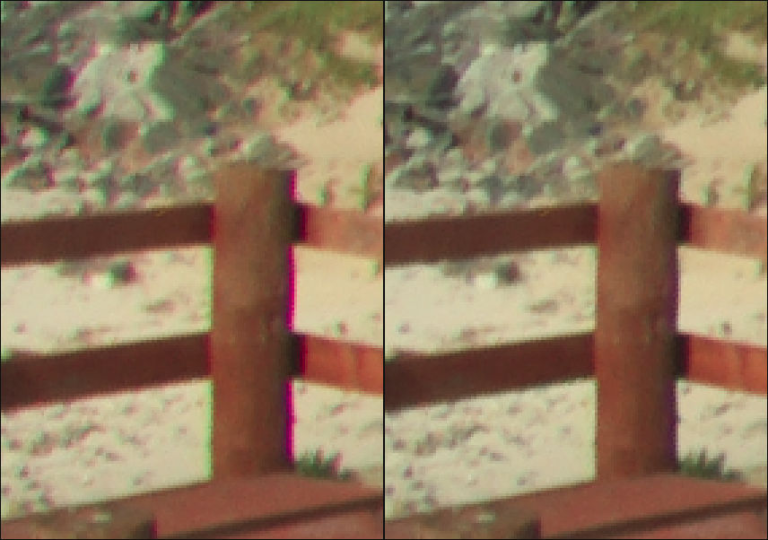
Some renderers, especially game engines like Unreal do a good job of approximating all of these lens related phenomena, but most renderers acknowledge that lenses are outside of their field of expertise, and leave you to do it in compositing. Luckily, they’re all very simple effects to add, and can make a huge difference to your final results.