
If you’re brand new to lenses, a good starting point is this “Know your Lenses” explainer. If you’re comfortable with that, here’s something else to chew on -
LENS DISTORTION.
Basically as light passes through a lens on its way to a camera sensor, there’s always going to be some distortion. On some lenses, it’s more exaggerated than others - generally the wider you go, the more distortion you’re going to see.
Worth being clear that this is a separate thing from lens length. Length is about how compressed or expanded your image feels based on your distance to the subject. Distortion comes from the optical design of the lens, how the glass itself bends light. They’re not the same property, and one doesn’t determine the other, though in practice a lens’s distortion often does shift as you zoom in and out, sometimes quite a lot.

If a line isn’t a line, it’s lens distortion time.
Lens distortion is totally normal, and an expected artifact especially when shooting on a wide angle. It’s not an accurate representation of reality, but film doesn’t need to be.
However, it can be a headache when it comes to doing VFX. Some processes (like camera tracking) need an accurate recording of reality in order to recreate it (ie to recreate the real camera digitally, which is the purpose of camera tracking)
When creating digital renders, you’ll find CG doesn’t have distortion - you can choose the focal length of the lens, but that’s a different subject. The actual lens distortion will be different from lens to lens. A computer generated element is mathematically perfect, rendered through a virtual lens with none of the imperfections real glass has.
So if you’re compositing CG into a plate shot on a distorted lens, the CG will look wrong the second it sits next to your live action, because the real footage is warped and the CG isn’t.
The fix is a three step process: undistort your plate, do your CG work in that clean, distortion-free space, then redistort the final composite so it matches the original footage again. Skip any one of those steps and your CG will feel like it’s floating in a different world than your plate, even if everything else about the shot is nailed.
For that reason, VFX teams will normally bring a distortion grid to set - just a simple line and checkerboard image that makes it easy to see (and therefore undo) the lens distortion). You just film it once per lens, and then you can use it to undistort every shot filmed with that lens.
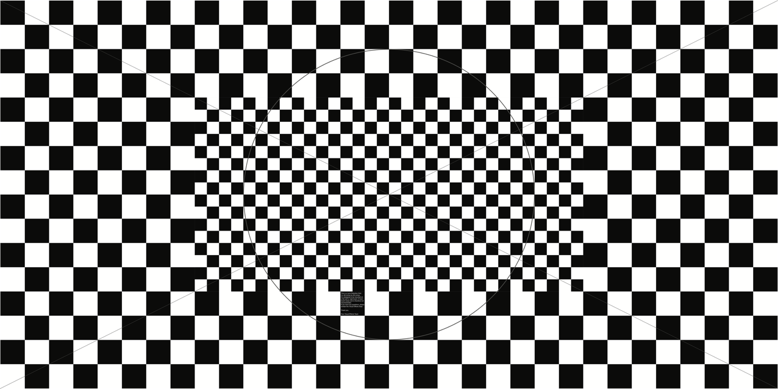
Distortion grid. Also works for hypnosis.
To go deeper with lens distortion, check out our lens distortion cheat sheet here: